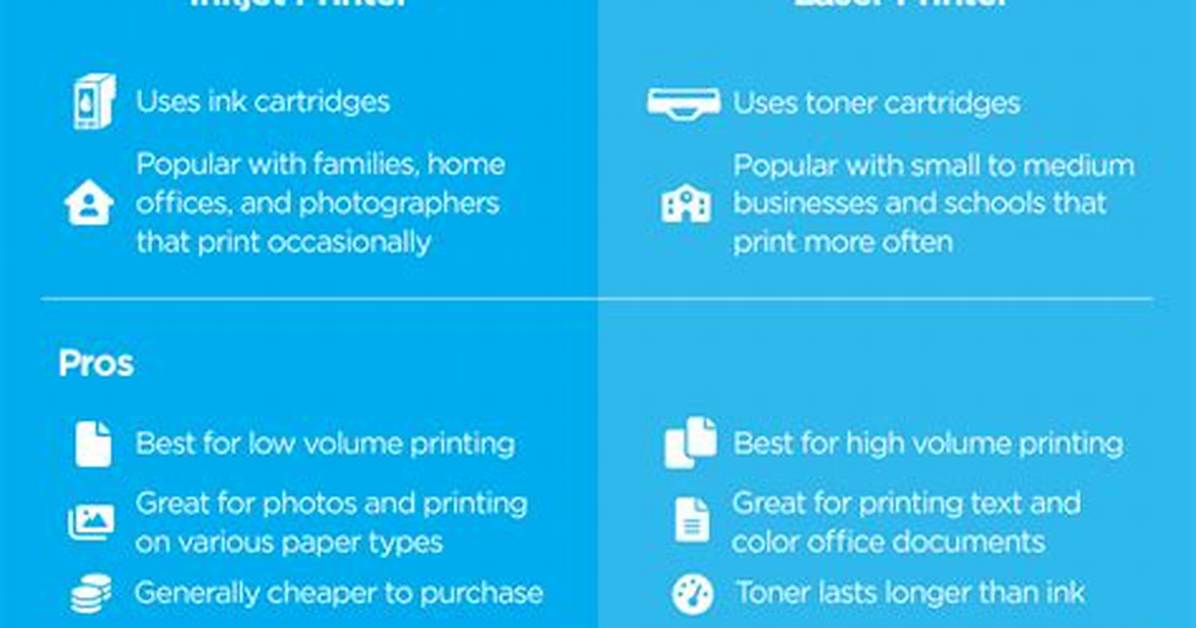
A few decades ago, choosing between an inkjet and a laser printer was more clear-cut. Laser printers were often considered to deliver cheaper printing costs but required a larger upfront investment in the hardware, while inkjets ruled the color and photographic printing world. Today, with both technologies catching up to each other, choosing the right printer for your home or small business is a bit more convoluted depending on what your needs are. Thankfully, given that the technologies in both inkjet and laser printers have improved significantly in recent years, you’ll be happy with either choice. But if you need some guidance on which printer is best for your needs, budget, and type of work, we’re here to help you pick the right printer for you.
If you just want to skip to buying a printer, here are the best printers available.
Which type of printer is faster?
Traditionally, laser printers are considered the speed champs, but thanks to advances in printing technology, inkjets have steadily caught up with their rivals. Cheaper inkjet printers, and particularly portable printers designed for travel, are often slower than mainstream laser printers. These printers generally output about eight to 10 pages per minute, but larger, more premium inkjets designed for business use are much more agile.
HP’s latest PageWide Pro 477dw is one example of a speedy inkjet printer that outperforms its laser rivals in printing speeds and costs, but it requires a heftier upfront investment than traditional home inkjet printers. The printer can print at speeds of up to 55 pages per minute, and it is able to do this with HP’s PageWide printing technology. On traditional inkjet printers, the nozzle has to move back and forth on a moveable print head to cover the entire paper width, but with the PageWide technology, the stationary nozzle doesn’t need to move back and forth to cover the paper width. The printer retails for $700 and is likely priced out of the reach of most homes, but it is a great example of how inkjet printers are closing the gap on laser printers in several ways.
More common home inkjet printers, like HP’s $250 Envy Inspire 7900e, are still capable of printing with speeds up to 15 pages per minute, which is more than adequate for most small print jobs. On the other hand, HP’s LaserJet Pro M283 Color costs almost twice as much and is just 50% faster. A more direct comparison to the LaserJet Pro is HP’s OfficeJet Pro 9025e, an inkjet printer that’s designed for the office and comes with a speed rating of up to 24 pages per minute. This shows that laser printers aren’t necessarily faster than inkjets if speed is a concern.
Printing speed is a larger concern for offices and home offices rather than general home printing. When you’re just printing several pages at a time at home, speed is less of a concern than when you’re trying to print and collate reports and documents that can be hundreds of pages long at a time.
Summary: The speed gap between inkjets and lasers is quickly closing, so choose a printer based on your print needs.
Can a laser printer be used for photo printing?
By using ink to render pixels on paper, inkjets are more adept at blending colors, leading to better tonal range and detail rendering, making for more dynamic and vivid photos. Glossy photo paper will also enhance an inkjet’s photo rendering capabilities, showing vivid colors and better details. The downside with inkjets is that the ink cartridges are often smaller than laser toner drums, and over time, will cost more to replace.
In more recent years, thanks to advances in printing technology, laser printers are quickly catching up to their inkjet counterparts for photo-quality prints. Professionals may still want to stick with inkjets, but advanced laser printers will be more than capable for homes and small offices that do not want to invest in two different printing systems. Like inkjets, there are specially designed photo papers, ranging from glossy to matte, that will work with lasers and can cope with this technology’s use of heat in the printing process.
In our picks for the top color laser printers, systems like Canon’s imageCLASS MF644Cdw are suitable for a wide range of color print jobs, including photo printing, making it a versatile addition to any office. And even though you may save on the per-page printing costs by opting for a color laser printer – laser printers generally cost more upfront, and toner for each color (black, cyan, yellow, and magenta) are more expensive to replace than inkjet cartridges but will last far longer – they are often bulkier and require more space than a conventional inkjet, like Canon’s Pixma TS9521C.
The benefit of inkjet is that you can have borderless prints. Wide-format inkjets can also print stunning photographs and portraits in sizes larger than the typical 8.5 inches by 11 inches that’s typical of most laser printers on the market. In the professional market, there are specialty inkjet printers for printing to a wide variety of media, including vinyl.
If you’re printing just occasionally in the home, an inkjet, particularly a multifunction inkjet printer, may be the best option, as it balances cost, printer size, and performance. When choosing a photo inkjet printer, choose one that supports at least four separate ink cartridges for the best performance. More advanced models may support six or more cartridges, and the added ink colors add more dynamic range to your photographs. A higher dynamic range in printing will result in less or no banding, in particular if your photo contains large swaths of blue skies. Here, printers with a low dynamic range will not be able to render all the gradients of the sky smoothly, and you’ll notice bands of varying shades of blue.
And if you want your photos to last, be sure to use photo archival paper that was designed for your printer. Canon and Epson each have their own photo paper with different surfaces — glossy, semi-glossy, and matte — that are designed to last for up to 100 years without fading.
Summary: Choose an inkjet printer with at least four separate ink cartridges for vivid prints with a high dynamic range in your color photos.

