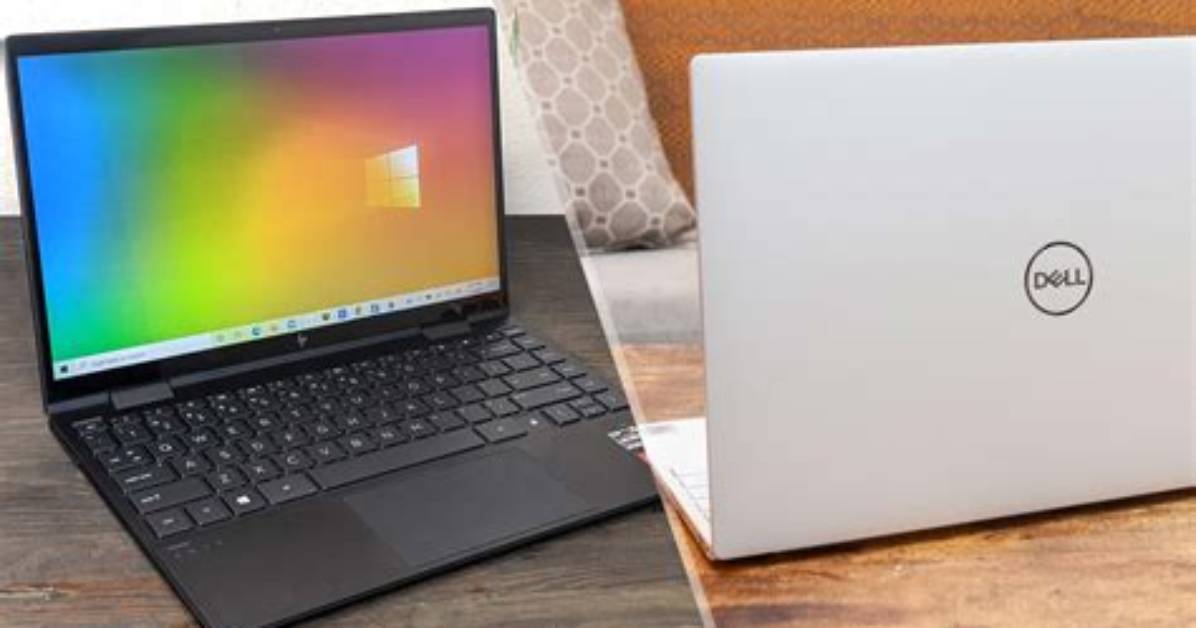
The laptop market is starting to lean toward 14-inch laptops and away from 13-inch laptops, but that doesn’t mean there are no great examples of the latter. The Dell XPS 13 9315 and HP Envy x360 13 are both worthy models .
Both of these laptops are relatively affordable and they offer great performance, builds, and creature comforts. But only one can be crowned as the best. Which wins this shootout?
Specs
| HP Envy x360 13 | Dell XPS 13 9315 | |
| Dimensions | 11.75 inches x 8.46 inches x 0.63 inches | 11.63 inches by 7.86 inches by 0.55 inches |
| Weight | 2.95 pounds | 2.59 pounds |
| Processor | Intel Core i5-1230U Intel Core i5-1250U | Intel Core i5-1230U Intel Core i7-1250U |
| Graphics | Intel Iris Xe | Intel Iris Xe |
| RAM | 8GB LPDDR4x 16GB LPDDR4x | 8GB LPDDR5 16GB LPDDR5 32GB LPDDR5 |
| Display | 13.3-inch 16:10 WUXGA (1920 x 1200) IPS 13.3-inch 16:10 WQXGA (2560 x 1600) IPS 13.3-inch 16:10 2.8K (2880 x 1800) OLED | 13.4-inch 16:10 Full HD+ (1920 x 1080) IPS non-touch 13.4-inch 16:10 Full HD+ IPS touch |
| Storage | 512GB PCIe SSD 1TB PCIe SSD | 512GB PCIe SSD 1TB PCIe SSD |
| Touch | Yes | Optional |
| Ports | 2 x USB-C4 with Thunderbolt 4 2 x USB-A 3.2 Gen 2 1 x 3.5mm audio jack 1 x microSD card reader | 2 x USB-C with Thunderbolt 4 |
| Wireless | Wi-Fi 6E and Bluetooth 5.2 | Wi-Fi 6E and Bluetooth 5.2 |
| Webcam | 5MP with infrared camera for Windows 11 Hello | 720p with Windows 11 Hello infrared camera |
| Operating system | Windows 11 | Windows 11 |
| Battery | 66 watt-hours | 51 watt-hours |
| Price | $900+ | $849+ |
| Rating | 4.5 out of 5 stars | 4 out of 5 stars |
Both laptops are similarly priced, right where you could call them slightly expensive budget laptops or midrange machines. The Envy x360 13 starts at $900 for a Core i5-1230U CPU, 8GB of RAM, a 512G SSD, and a 13.3-inch 16:10 Full HD+ IPS touch-enabled display. The most you’ll spend is $1,300 for a Core i7-125oU, 16GB of RAM, a 1TB SSD, and a 2.8K OLED panel.
The XPS 13 9315 has fewer available configurations. It starts at $850 for a Core i5-1230U, 8GB of RAM, a 512GB SSS, and a Full HD+ IPS non-touch display. At the high end, it costs $1,399 for a Core i7-1250U, 32GB of RAM, a 1TB SSD, and the same display with touch.
You get more RAM at the high end with the XPS 13 9315 for $100 more, but the Envy x360 13 gives you a beautiful OLED display. We give the pricing and configuration win to HP.
Design
The XPS 13 9315 is a complete redesign, dropping the glass or carbon fiber palm rest and using an all-aluminum chassis in Sky or Umber colors instead. It retains its sleek exterior but is a simpler, more modern design. It’s an attractive, if very minimalist laptop. The Envy x360 13 is more extravagant, with complex angles complementing simple lines, as well as Natural Silver and Nightfall Black color schemes. It’s fairly minimalist as well, and so while it looks different than the XPS 13, neither can be characterized as being better-looking. The XPS 13 9315 does benefit from smaller display bezels, which lends it more of an air of modernity.
The large bottom chin on the XPS x360 13, needed to accommodate the clamshell, tent, media, and tablet modes of the convertible 2-in-1, do make it a deeper laptop, and it’s also thicker and heavier. The differences aren’t tremendous, though, and both laptops are small enough to easily carry around.
Both laptops are rigidly built, with no bending, flexing, or twisting. That’s great to see given the reasonable prices. Each has a hinge that can be opened with one hand, and they’re equal in their overall build qualities.
They both also have excellent keyboards, with plenty of key spacing and nicely sized keycaps. Their switches are snappy and precise, and are comfortable for long typing sessions. The same can be said for their similarly sized mechanical touchpads, which are comfortable and precise. The biggest difference is that the Envy x360 13 comes with a touchscreen by default and supports pen input supporting Windows Inking.
Connectivity favors the Envy x360 13, which offers two USB-A ports to go with its two Thunderbolt 4 ports, plus a microSD card reader and a 3.5mm audio jack. The XPS 13 only offers the two Thunderbolt 4 ports. Both devices have the most up-to-date wireless connectivity available.
Finally, the Envy x360 13 benefits from a 5MP webcam that’s capable of 1080p video, a huge improvement over the XPS 13 9315’s 720p version. Both have infrared cameras for Windows 11 Hello support.

